This guide explains how to add a SwissCenter mailbox to Mozilla Thunderbird, using IMAP.
In short: open Account Settings, then Add Mail Account, choose IMAP and Manual config: server mail01.swisscenter.com (or the one from your console), port 993 incoming and 465 outgoing, SSL/TLS security, username = your full email address.
Prerequisites
- The email address must have been created beforehand in the Apanel console, under E-mail addresses, and you must know its password.
- The name of your domain's email server: it is shown in Hosting management, in the Misc informations box on the left, on the line E-mail SSL server name (POP3S / IMAPS / SMTPS). This article uses
mail01.swisscenter.com; if your console shows another name, use the one from the console.
What you need to know before you start
- The screenshots come from an older version of Thunderbird: the windows look different today, but the menus and fields to fill in have the same names.
- With IMAP, messages stay on the server: you find the same mailbox from webmail, your phone or another computer.
How do I add the account in Thunderbird?
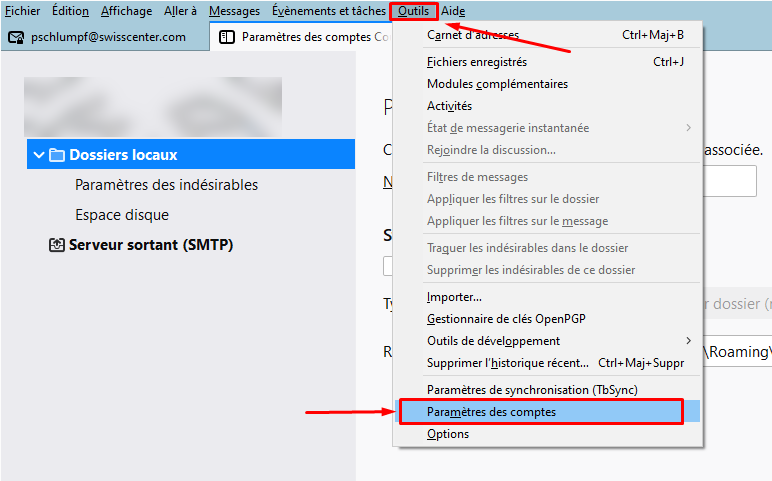
- Open the Thunderbird main menu (the three-line button, top right), then Account Settings. If the menu bar is shown, the same screen opens from Tools > Account Settings.
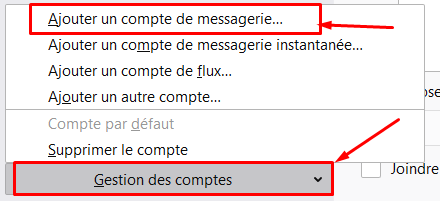
- In the window that opens, in the bottom left corner, click the Account Actions drop-down list and choose Add Mail Account.
-
Fill in:
- Your Name: what the recipient will see when you send a message;
- Email Address: the address created in the Apanel console;
- Password: the mailbox password.
Click Continue.
-
Thunderbird tries an automatic detection. Choose IMAP (see POP or IMAP: what are the differences and which protocol should you choose?), then click Manual config.
-
Fill in the fields as follows (enter these values, whatever Thunderbird suggests or other guides show):
| Field |
Incoming server |
Outgoing server |
| Hostname |
mail01.swisscenter.com |
mail01.swisscenter.com |
| Port |
993 |
465 |
| Connection security |
SSL/TLS |
SSL/TLS |
| Authentication method |
Normal password |
Normal password |
| Username |
Your full email address |
Your full email address |
- Click Re-test, then Done (or Create Account).
If something goes wrong
- Thunderbird warns that the connection is not encrypted, or that the certificate is not valid: do not go past the warning. Check that the Connection security is SSL/TLS for both servers, that the hostnames are exact and that your computer's date and time are correct.
- The password is refused: the username is your full email address, not only the part before the
@.
- Sending fails while receiving works: port
465 may be blocked by your network. Try port 587 with STARTTLS security.
The settings common to all email software are listed in Email settings for all clients (IMAP, POP, SMTP).
Mozilla's guide describes this screen: Manual account configuration.
Going further