Transferring a domain name to SwissCenter is done from the domain names management console: you enter the domain and the transfer code obtained from your current provider, choose your contacts, then confirm the order. This article applies to .ch and .li domains as well as to the other extensions we offer (.com, .net, .org, etc.).
In short: in the Domain names management console, click Transfer domain, enter the domain and its Transfer code, choose the contacts, then Confirm order. The domain must be unlocked and DNSSEC disabled at the previous provider.
Prerequisites
Before you start, gather the following:
- a SwissCenter customer account, with access to the Domain names management console (it opens from the menu of your customer area);
- the transfer code (also called authorization code or auth code), issued by the provider where the domain is currently registered;
- a domain that is unlocked at that provider: a domain locked against transfer is refused;
- DNSSEC disabled at your current provider: a domain protected by DNSSEC cannot be transferred while this option remains active;
- an extension listed in the Extensions prices card on the console dashboard;
- at least one domain contact (name, address, email). You can create one during the order.
Also make sure the domain contact email address is up to date at the previous provider: the code is almost always sent there.
What you need to know before you start
The transfer affects neither your website nor your emails, on one condition. SwissCenter does not change the domain's name servers: the ones declared at the previous provider are read back and kept, and the DNS zone is not rewritten. A transfer therefore changes who manages the domain, not its configuration. The condition: if your name servers belong to the previous provider, the DNS zone they host must keep answering after the transfer. Check this with them before you start, then verify your DNS records once the operation is complete.
DNSSEC signatures declared at the registry are removed when the domain arrives. This is why DNSSEC must be disabled before the transfer. You can enable it again afterwards from the domain page (see the article on DNSSEC).
The process depends on the extension.
For a .ch or .li domain, the code is checked against the registry as soon as you submit the form. The transfer is then carried out when you confirm the order, and the domain becomes active without any waiting. SWITCH is no longer a direct registrar: you get the code from your current provider. Only a domain still administered directly at SWITCH gets it from nic.ch.
For the other extensions (.com, .net, .org, etc.), the form checks that the domain is not locked, then the request is sent to the registrar. The domain stays Transfer in progress until the transfer is confirmed; it is then activated and linked to your contacts. This delay depends on the registry and the previous provider: we cannot guarantee how long it takes. The code is not checked on screen for these extensions, so a wrong code only shows up afterwards.
For a .fr domain, a refusal from the form points you to our support. The transfer then continues with them, not from the console.
A transfer is billed. The console applies the extension's annual price (Extensions prices card), shows the total before you confirm, and issues an invoice. Until it is paid, a Pay my invoice button appears on the domain's line.
While the transfer is in progress, the domain's management page is not accessible. The domain is in the list, but you cannot change its contacts or name servers until it is active.
Transfer the domain
1. What do I prepare at the previous provider?
In the customer area of the domain's current provider, unlock the domain for transfer, disable DNSSEC if it is active, request the transfer code and check the domain's contact email address.
The process varies from one provider to another; it is generally found in the section dedicated to the domain.
To check that DNSSEC is disabled, analyze the domain with diag.swisscenter.com (the tool is in French): in the Infrastructure & Whois card, the Signature de la zone (DNSSEC) line should say DNSSEC inactif (inactive). The tool queries public resolvers that keep their answer for its time to live: a DS that has just been withdrawn may still show up for a while.
2. Open the transfer form
Open the Domain names management console, then click Transfer domain in the navigation bar.

You can also start the request from the Domain Name Transfer page of the swisscenter.com website.
3. Enter the domain and its code
In the Informations for the transfer card, fill in the Domain name to transfer and its Transfer code, then click Next step. For several domains, add one line per domain.
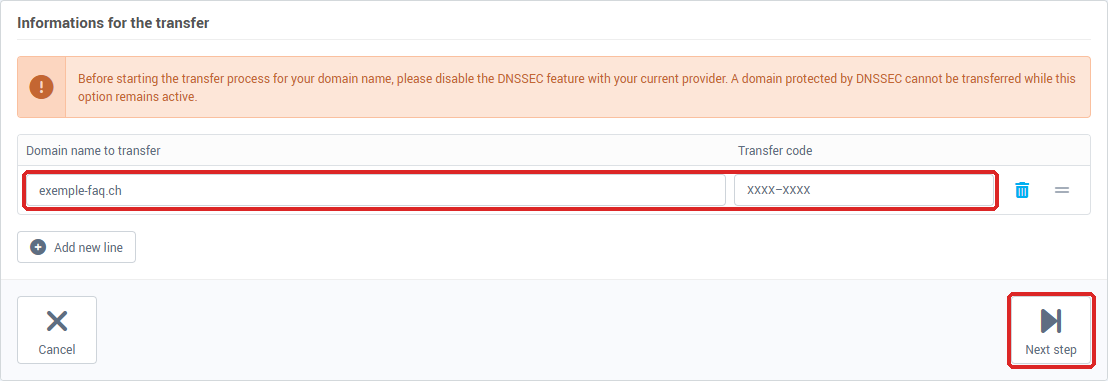
If the form rejects the line, a message appears next to the field concerned (see "If something goes wrong" below).

4. Choose the contacts
On the Contact assignment screen, choose the domain's Owner contact. If your account has no contract, a Billing contact is also required. A missing contact can be created with Add new contact. Then click Next step.
5. Review and confirm the order
The order summary lists each domain with its price, then the Total excl. VAT and the total including VAT. Tick the box accepting the SwissCenter general terms and conditions, then click Confirm order.
You return to the dashboard with the message "Thank you for your transfer request, you will find the domain(s) in the list below".
6. How do I follow the progress of the transfer?
The domain appears in the Domain names list. As long as the transfer is not finished it carries the Transfer in progress label; once finished, it becomes an active domain, with its renewal date and name servers.
Then check your DNS records, your website and your emails.
An analysis with diag.swisscenter.com shows them all at once: in the Infrastructure & Whois card, the Bureau d'enregistrement (Registrar) line shows the new registrar (for a .ch or .li domain, the tool keeps this information for up to 6 hours) and Serveurs de noms (NS) (name servers) should list the same servers as before; the Entrées Web & Mail (web and mail records) card shows your website's addresses and your MX records. See Diagnose your domain and email with the SwissCenter diagnostic tool.
How do I transfer a domain to another provider?
To transfer a domain we host to another provider, open the domain page and click Transfer code (reserved for the domain owner). Copy the code with Copy and give it to your new provider; Regenerate produces a new one. Do not use Remove the domain: once the transfer is done, the domain is removed from our services automatically.
The console has no command to lift the transfer lock: ask our support.
If something goes wrong
If the form refuses the domain, here is what the messages mean:
- This domain is already registered in our system: the domain is already in a SwissCenter console.
- This domain is not transferable at the moment: the code is refused, or the domain is locked or has an operation in progress at the previous provider. Check the code, the lock and that no operation is pending, then try again.
- This domain cannot be transferred automatically due to certain restrictions: this is what the form answers to a refused .fr; contact us.
- The extension ".xxx" is not available: the extension is not offered in the console; use the contact us link in the Extensions prices card.
If the console shows Maintenance in progress, try again a little later.
If the domain shows Error during transfer, our team is notified. The transfer can be restarted with a corrected code: send us the right code through support.
If a domain (other than .ch and .li) stays on Transfer in progress for a very long time, or if the previous provider refuses to issue the code, open a ticket with our support team specifying the domain name concerned.
See also: Managing your domains from the SwissCenter console.
Going further