DNSSEC is an additional protection for your domain name: the DNS answers for your domain are signed, which lets resolvers that check them refuse a forged answer. For a domain registered with SwissCenter and served by our name servers, the domain names console in your Apanel console lets you enable it, then disable it, in a few clicks.
When you click Enable DNSSEC, the console creates a signing key for your domain's DNS zone on our servers, then publishes the matching key (the DS record) at the domain's registry. You do not have to type or copy any key yourself.
Prerequisites
- Be the owner of the domain name, or its technical contact
- The domain must be registered with SwissCenter: only these domains appear in the domain names console
- The domain must be delegated to our name servers (
ns1.swisscenter.com to ns4.swisscenter.com): see the article on name servers
- The domain's DNS zone must exist with SwissCenter, that is, the domain must be set up on your hosting with the DNS service
What you need to know before you start
- The button only appears in the right cases. Enable DNSSEC is offered only if all of the domain's name servers are ours and the domain's DNS zone exists with us. If the name servers belong to another DNS host, or if none is configured, the button is not displayed: first delegate the domain to our servers.
- Domain registered elsewhere. A domain registered with another registrar does not appear in the console: the SwissCenter console cannot enable DNSSEC on it. Contact us if you need DNSSEC in that case.
- You can no longer change the name servers while DNSSEC is active. The console warns you before enabling, and the Edit button of the Name servers blockk disappears. To change name servers, you must first disable DNSSEC.
- Never leave our servers with DNSSEC active. The key published at the registry matches the zone hosted with us. If the domain is served elsewhere while this key is still published, resolvers that check DNSSEC can no longer validate the answers and the domain becomes unreachable for them. Disable DNSSEC before delegating the domain to another DNS host.
- Transfer to SwissCenter. If you transfer a domain to us, disable DNSSEC at your current provider before starting the transfer: a domain protected by DNSSEC cannot be transferred while the option remains active.
- What disabling does. Disable DNSSEC removes the key published at the registry and makes the option inactive in the console. The signing key itself stays on our servers, scheduled for deletion 24 hours later. If you enable DNSSEC again before that deletion, the existing key is reused.
- Delay. The console gives no delay for the registry or internet users' resolvers to take the change into account. After enabling or disabling, do not change DNS host right away.
Enable DNSSEC for a domain
- Log in to your Apanel console.
- In the top menu, click Domain names management console. The domains console opens in a new tab. If the entry does not appear, your domain names are not attached to this account: contact us.
- On the Dashboard, the Domain names list block shows each domain with its DNSSEC line (Enabled or Disabled) when it is served by our name servers. Click the name of the domain.
- On the Domain name dashboard page, find the Name servers blockk. Check that it lists our name servers.
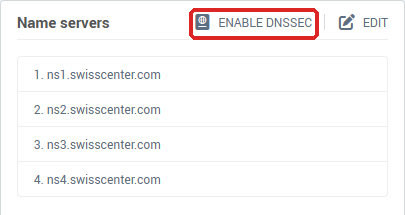
- At the top of the block, next to Edit, click Enable DNSSEC. If this button does not appear, see "Troubleshooting".
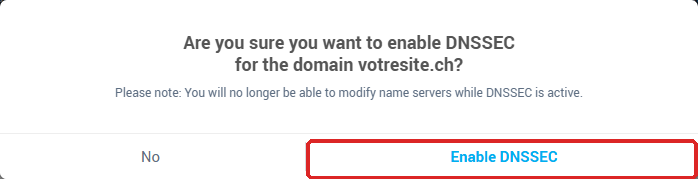
- A window asks "Are you sure you want to enable DNSSEC for the domain votresite.ch?" and reminds you: "Please note: You will no longer be able to modify name servers while DNSSEC is active." Click Enable DNSSEC to confirm, or No to cancel.
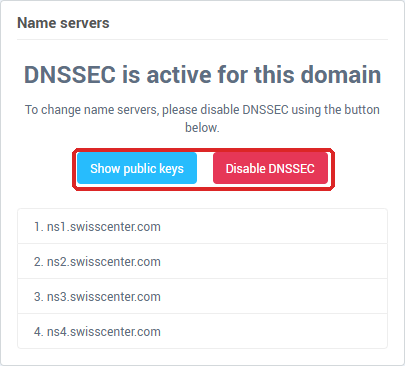
- The window closes and the page reloads. The console shows no success message: the Name servers blockk now shows "DNSSEC is active for this domain", with the Show public keys and Disable DNSSEC buttons, and the DNSSEC line of the Domain names list says Enabled.
Show the public keys
When DNSSEC is active, the Show public keys button opens the DNSSEC : Public keys window. It shows a table with the columns keytag, algo, digest type and digest: these are the values of the DS record published at the registry. You only need them if a third party asks you to check them. These values are read back from the registry and kept in memory for 100 seconds: if the table is empty, close the window and reopen it a little later.

Disable DNSSEC
- In the domain names console, click the domain name, then find the Name servers blockk, which shows "DNSSEC is active for this domain".
- Click Disable DNSSEC.
- The window asks "Are you sure you want to disable DNSSEC for the domain votresite.ch?" and shows "Warning: this operation cannot be undone." Click Disable DNSSEC to confirm, or No to cancel.
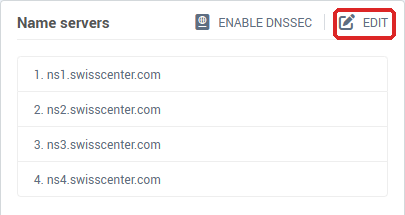
- The page reloads, with no success message. The Edit button and the Enable DNSSEC button come back in the Name servers blockk (the latter only if the domain is still served by our name servers), and the DNSSEC line of the Domain names list says Disabled. You can then change the name servers: see the article on name servers.
Troubleshooting
- The Enable DNSSEC button does not appear: the domain's name servers are not all ours (or none is configured), or the domain's DNS zone does not exist with us. First delegate the domain to
ns1.swisscenter.com to ns4.swisscenter.com (see the article on name servers) and check in the DNS manager that the domain is set up on your hosting.
- The Edit button does not appear: DNSSEC is active on the domain. Click Disable DNSSEC and confirm, then change the name servers.
- The DNSSEC line does not appear in the Domain names list: it is only shown for domains served by our name servers.
- "An error occurred during the operation. Error code: …": the operation did not complete. Try once more; if the message comes back, contact us and give the error code shown.
- After clicking Enable DNSSEC, the button is still there: nothing was enabled. Check the conditions above, then contact us.
- The domain is not accessible in the console, or the page denies access: this happens when the domain has the status "Waiting for payment", "Transfer in progress", "Error during transfer", "Suspended" or "Updates disabled". Pay the invoice, wait for the transfer to finish, or contact us for the other cases.
- Your website or email is no longer reachable from some networks after changing DNS host: DNSSEC was probably still active. If you still have access, disable DNSSEC; otherwise contact us.
- The option shows "enabled" but the domain no longer responds or misbehaves: disable DNSSEC, then contact us with the domain name and the time of activation.