You can pay a SwissCenter invoice in three ways: with the QR-bill from your e-banking or your bank's app, online (Visa, Mastercard, PostFinance, PayPal or Twint) on the swisscenter.com website, or by bank transfer if you are paying from abroad.
In short: from Switzerland, scan the QR code of the QR-bill in your e-banking, or pay online at https://www.swisscenter.com/en/home#payments with the Invoice number; from abroad, make a bank transfer stating that number in the message.
Prerequisites
- The invoice number. It appears on the invoice and in the email that comes with it. You can also find it in your Apanel console: click My account, then My invoices in the left-hand menu; the Number column gives it for each invoice, and the State column tells you whether it is Waiting, Paid or Credited.
What you need to know before you start
- The orange payment slip (BVR) no longer exists since 30 September 2022. Our invoices carry a QR-bill: a payment part with a QR code that contains our details, the amount and the invoice reference.
- The invoice email contains a link to the PDF invoice and a link to the online payment page.
- Bank transfer is reserved for payments from abroad. From Switzerland, use the QR-bill or online payment.
- Always state the invoice number in the message of a bank transfer: without it, we cannot match your payment. With the QR-bill, the reference is filled in automatically when you scan the code.
How do I pay with the QR-bill?
- Open your e-banking or your bank's app.
- Choose payment by QR-bill, then scan the QR code in the payment part of the invoice.
- Check the amount and the payee, then confirm the payment.
If you do not have the invoice at hand, open it from the link in the invoice email.
How do I pay online (card, PostFinance, PayPal, Twint)?
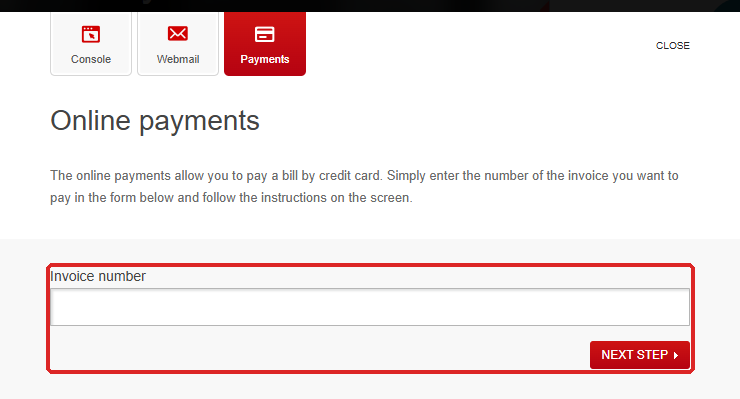
- Go to https://www.swisscenter.com/en/home#payments, or click the payment link in the invoice email. The Online payments window opens.
- Enter the Invoice number, then click Next step.
- The Online payments page sums up the invoice: Invoice number, Prestation and Amount. Check them.
- Under Payment methods, click the payment method of your choice:
| Payment method |
What it is |
| Secure payment with Visa |
Visa credit card |
| Secure payment with Mastercard |
Mastercard credit card |
| Secure payment with Postcard |
PostFinance card |
| Secure payment with Postfinance |
Payment with PostFinance E-Finance |
| Secure payment with Paypal |
PayPal account |
| Secure payment with Twint |
Twint app |
- You are redirected to the secure payment page of our payment provider. Follow the instructions to the end: the Payment confirmation page confirms that the payment has been recorded.
If your invoices are still sent to you by post, the page also offers the Remove post mail sending button: your next invoices will then be sent to you by email only.
How do I pay by bank transfer from abroad?
Make a transfer with the following details, and state the invoice number in the message to the payee:
| Item |
Value |
| Payee |
OpenBusiness SA, Av. Gratta-paille 2, 1018 Lausanne, Switzerland |
| Bank |
Banque Cantonale Vaudoise, Place St-François 14, P.O. Box 300, 1001 Lausanne, Switzerland |
| IBAN |
CH08 0076 7000 A099 1943 7 |
| BIC / SWIFT |
BCVLCH2LXXX |
| Clearing |
767 |
Troubleshooting
| Message or situation |
What to do |
| "The invoice was not found." |
The number you entered does not match any invoice: copy it again from the invoice or from My invoices. |
| "The invoice is already paid." |
Your payment is already recorded: there is nothing to do. |
| "The invoice is not paid." |
Despite its wording, this message means that the number does not match any invoice to be paid: check it, then look at its State in My invoices. A Credited invoice is no longer due. |
| "Transaction was canceled" |
The payment was interrupted before the end. Start again from step 1. |
| A question about the amount of an invoice |
Open a request and state the invoice number. |
Going further