Our diagnostic tool, diag.swisscenter.com, analyzes a domain name as the Internet sees it: its registrar, its name servers, DNSSEC, its website's addresses, its mail servers (MX), its SPF, DMARC and DKIM records, then its website's certificate and response. It is public and free, needs no account, works for a domain hosted with us or elsewhere, and changes nothing. Use it to check for yourself the result of a change made in the Apanel console, and to attach a diagnosis to a request to our support. The tool is in French only: this article quotes its labels in French, in bold, exactly as they appear on screen.
What you need to know before you start
- What the tool reads. The A, AAAA, MX and NS records of the analyzed name, its SPF and DMARC, the DKIM keys published under common selectors, the domain's DNSSEC status and registrar, then the certificate served on port 443 and the response of the website's home page.
- What it does not read. Other TXT records (ownership verification, for example) are not shown. A CNAME only appears through the addresses of its target. A DKIM key published under an unusual selector may not be found. The tool sends no email and does not read the content of your pages: it checks the configuration, not how your mailboxes work.
- The
www. prefix is removed. www.yoursite.ch is analyzed as yoursite.ch. A full web address or an email address is accepted: the tool only keeps the domain name.
- A subdomain is accepted, for example
shop.yoursite.ch, and marked with the Sous-domaine (subdomain) badge. The registrar and DNSSEC are then those of the main domain; if the subdomain has no name servers of its own, those of the main domain are shown.
- Resolver and cache. The tool queries DNS at the time of the analysis, through a resolver that keeps each answer for its time to live (TTL). Right after a change, it can therefore still show the old value: run the analysis again once that time has passed (4 hours by default in the DNS manager). DNSSEC is checked through public resolvers (Cloudflare, Quad9 and Google), which follow the same rule. For a .ch or .li domain, the tool keeps the registrar's name in memory for up to 6 hours.
- Rate limit. To prevent abuse, a single connection can run a series of about six diagnoses, then about four per minute. Beyond that, the tool shows « Trop de diagnostics en peu de temps » (too many diagnoses in a short time) and how long to wait.
Run a diagnosis
- Open diag.swisscenter.com.
- In the input field (« Ex: domaine.ch »), enter your domain name, for example
yoursite.ch.
- Click Analyser le domaine (analyze the domain).

- The result appears within a few seconds. The Site web (TLS & HTTP) card and the DKIM line arrive a little after the rest: wait until they have loaded before reading or copying the diagnosis.
To run a domain's diagnosis again later, open its link directly, in the form https://diag.swisscenter.com/diag/yoursite.ch: the analysis starts by itself.
The header and the findings
At the top of the result, next to the analyzed name, the DNS Répondu (DNS answered) badge means that the domain publishes at least one address or one MX; Aucune réponse DNS (no DNS answer) means that it publishes neither.
The Constats (findings) card sums up the problems found on the domain, its addresses, its SPF and its DMARC, from the most to the least serious: Critique (critical), Attention (warning), then Info. For example, « Le domaine ne résout vers aucune adresse (ni A ni AAAA). » (the domain resolves to no address) is critical, and « Aucun enregistrement DMARC. » (no DMARC record) is a warning. The card only appears when there is at least one finding: a domain that keeps our default values normally has none. Findings about DKIM and about DMARC report recipients appear under the line concerned, in the Sécurité E-mail (email security) card.

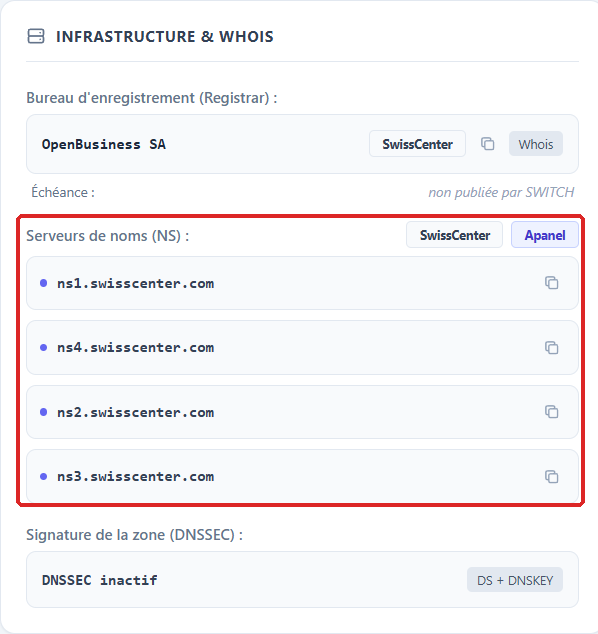
Infrastructure & Whois
- Bureau d'enregistrement (Registrar): the company with which the domain is registered, with a badge when the tool recognizes the provider.
- Échéance (expiry): the domain's expiry date, with the number of days left; the badge turns orange at 30 days or less, and Expiré (expired) appears after the date. SWITCH does not publish this date: for a .ch or .li domain, the line says « non publiée par SWITCH » (not published by SWITCH).
- Serveurs de noms (NS) (name servers): the servers that answer for the domain. At SwissCenter,
ns1.swisscenter.com to ns4.swisscenter.com, with the SwissCenter and Apanel badges. « Aucun serveur NS trouvé » (no NS server found) means that the domain is not delegated, or that it does not exist.
- Signature de la zone (DNSSEC) (zone signature): DNSSEC actif (active) when the registry publishes a DS and the zone publishes its key; DNSSEC inactif (inactive) when no DS is published, which is the case until you enable it; DNSSEC cassé (broken) when a DS is published without a key in the zone, which makes the domain unreachable for resolvers that check DNSSEC; DNSSEC indéterminé (undetermined) when the resolvers did not give a conclusive answer.
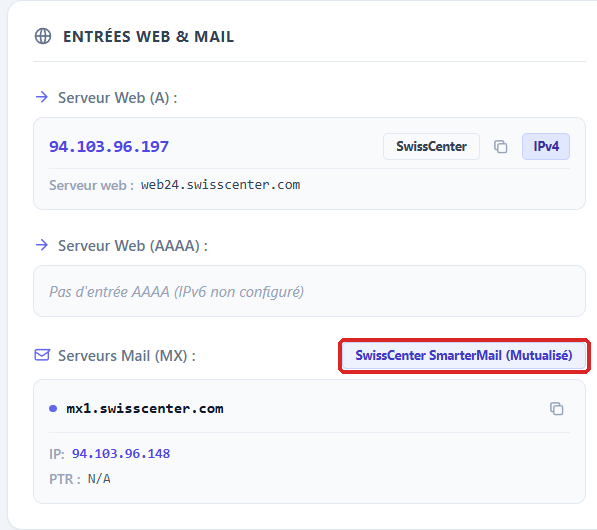
Entrées Web & Mail (web and mail records)
- Serveur Web (A) and Serveur Web (AAAA): the IPv4 and IPv6 addresses of the analyzed name. Each one carries a badge for the network that hosts it (SwissCenter for our servers) and, under Serveur web, the address's reverse name (PTR). For a name that is a CNAME, these are the addresses of its target. « Pas d'entrée AAAA (IPv6 non configuré) » (no AAAA record, IPv6 not configured) is not an error.
- Serveurs Mail (MX): the servers that receive your email, from the highest to the lowest priority, each with its IP address and reverse name (PTR). The badge above the list names the recognized provider: SwissCenter Mail for our email service, Microsoft 365, Google Workspace, another provider's name, or Messagerie Externe (external email). « Aucun enregistrement MX détecté » (no MX record found) means that nobody can write to this domain.
The Configuration automatique des clients mail (mail client autoconfiguration) card is reserved for our support: it does not appear for you.
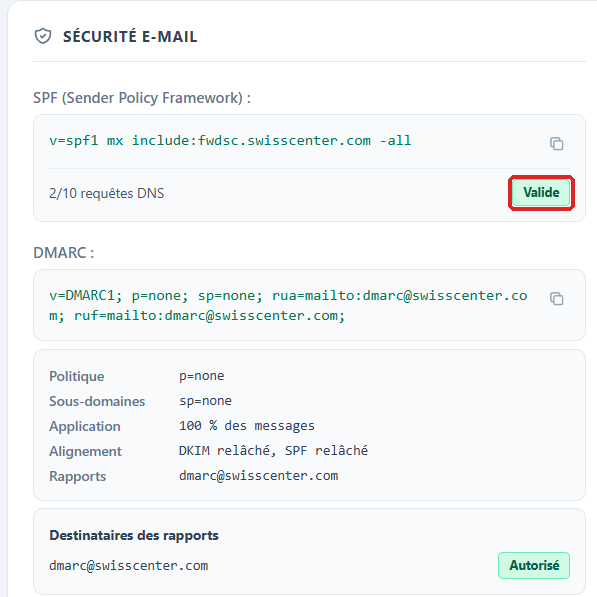
Sécurité E-mail (email security)
- SPF (Sender Policy Framework): the published record, then the number of DNS lookups it needs once the
include: mechanisms are expanded, 10 at most. At SwissCenter, the default value is v=spf1 a mx include:fwdsc.swisscenter.com -all, with the Valide (valid) badge. Proche du plafond (close to the limit) means there is little room left before 10 lookups; À revoir (to review), that the SPF does not authorize the detected email provider or ends with no all mechanism; Ignoré par les récepteurs (ignored by receivers), that two SPF records are published or that the limit of 10 lookups is exceeded.
- DMARC: the published record, then its plain reading: Politique (policy), Sous-domaines (subdomains), Application (share of messages), Alignement (alignment) and Rapports (reports). At SwissCenter, the default policy is
p=reject, with reports sent to dmarc@swisscenter.com. Under Destinataires des rapports (report recipients), each address carries a badge: Interne (internal), Autorisé (authorized), Non autorisé (not authorized: the recipient does not publish the authorization to receive these reports, so they are not sent) or Non vérifié (not checked). Non appliqué (not applied) means a DMARC record that is invalid or published twice.
- DKIM (Recherche sur sélecteurs courants) (search on common selectors): each key found, with its Sélecteur (selector), its Nom (name) and its Valeur (value), which you can copy, and the Détecté (detected) badge. For a domain on our email service, the tool can read the selector on our server and says so with « Sélecteur confirmé » (selector confirmed); if the key is missing from your DNS, it shows « Absent du DNS » (missing from DNS) and the Non publié (not published) badge, and the Nom and Valeur shown are the record to create. Otherwise, it tries a list of usual selectors: « Aucune clé DKIM détectée sur les sélecteurs usuels » (no DKIM key found on the usual selectors) and the Non trouvé (not found) badge therefore do not prove that DKIM is missing at another provider.
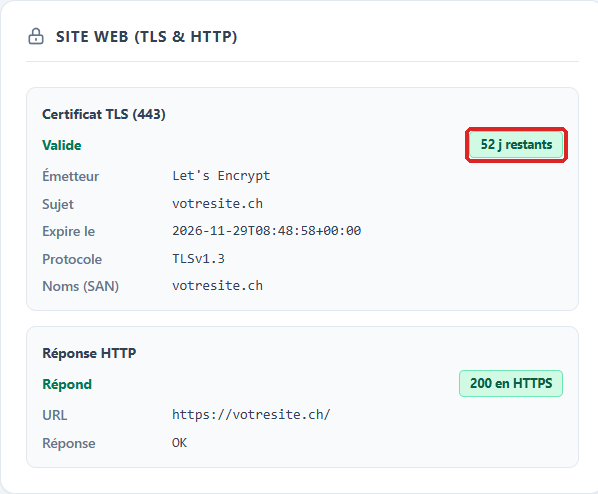
Site web (TLS & HTTP) (website)
- Certificat TLS (443) (TLS certificate): Valide (valid), with the number of days left, the Émetteur (issuer, normally Let's Encrypt with us), the Sujet (subject), the Expire le (expires on) date, the Protocole (protocol) and the names covered (Noms (SAN)). The badge turns orange at 30 days or less, and Expiré (expired) appears after the date. Refusé par un navigateur (refused by a browser) gives the Motif (reason), in English: expired certificate, name not covered, incomplete chain. Aucune poignée de main sur le port 443 (no handshake on port 443) means that the server does not answer over HTTPS.
- Réponse HTTP (HTTP response): the tool requests the home page over HTTPS, then over HTTP if HTTPS fails. Répond (answers) with a badge such as 200 en HTTPS is the expected result. Redirection gives the address under Redirige vers (redirects to): the tool does not follow redirects. Erreur (error) followed by the code (404, for example) or Erreur serveur (server error) means a page in error; a badge such as 200 en clair (in clear text) means a site that only answers over HTTP. Ne répond ni en HTTPS ni en HTTP (answers neither over HTTPS nor HTTP) means that the site is unreachable.
Send the diagnosis to our support
The buttons at the top right of the result are used to share the diagnosis:
- Ticket copies a summary ready to paste: domain, date and time, link to the diagnosis, and findings with their severity. The button shows Copié ! (copied). If a card was still loading, the summary says so: wait until loading is finished before clicking. The Site web (TLS & HTTP) card produces no findings: if your request is about the website, describe what it shows.
- Lien (link) copies the shareable link, in the form
https://diag.swisscenter.com/diag/yoursite.ch. This link runs the analysis again each time it is opened: it shows the domain's status at the moment it is opened.
- Imprimer (print) prints the result or saves it as a PDF; JSON downloads the full report in a technical format.
Paste the summary into your request by opening a request with our support team.

Troubleshooting
| What you see |
What to do |
| A red message under the field, for example « Ceci est une adresse IP : le diagnostic porte sur un nom de domaine. » (this is an IP address: the diagnosis is about a domain name) |
Enter a domain name with its extension, for example yoursite.ch. |
| Trop de diagnostics en peu de temps (too many diagnoses in a short time) |
Wait for the time shown under the message, then run the analysis again. |
| The tool still shows the old value after a change |
Check that the change was synchronized in the DNS manager, then run the analysis again once the old value's time to live (TTL) has passed. |
| Aucune réponse DNS (no DNS answer) |
The domain publishes neither an address nor an MX: check that it is registered, that its Serveurs de noms (NS) are the right ones and that its zone contains an A record. |
| DNSSEC indéterminé (undetermined) |
Run the analysis again a little later. If the status persists, contact our support and give the domain name. |
| A section says Non mesuré (not measured) |
The measurement could not be made. If a Motif (reason) is shown, it explains why, for example a name that resolves to no address; otherwise, run the analysis again. |
| Aucune clé DKIM détectée sur les sélecteurs usuels (no DKIM key found on the usual selectors) while DKIM is active |
Your provider may use a selector that the tool does not try. For our email service, check the DKIM page of the Apanel console. |
The result does not match www.yoursite.ch |
The tool removes www.: it analyzes yoursite.ch. |
Going further