Your domain yourdomain.ch is with SwissCenter, but you want a subdomain, for example shop.yourdomain.ch, to show a service hosted elsewhere (online shop, application, your company's server). All it takes is a DNS record that sends this subdomain to the other provider's server. Your main website and your mail do not change.
In short: in Hosting management, open the DNS manager and add an A record (IP address) or a CNAME (server name) with only shop as the name, then click Synchronize.
Requirements
- The DNS service enabled for the domain: the DNS service card appears in Hosting management.
- Your domain on our name servers (
ns1.swisscenter.com to ns4.swisscenter.com).
- The value given by the other provider: an IP address, or a server name.
Before you start
- This article is only about DNS. The subdomain's content is hosted by the other provider. To create a subdomain hosted with us instead, see Create and manage a subdomain.
- The record type depends on what the provider gives you:
| The provider gives you |
Type to choose |
An IPv4 address, for example 203.0.113.10 |
A (Name to IPv4) |
| An IPv6 address |
AAAA (Name to IPv6) |
A server name, for example mysite.provider.example |
CNAME (Alias) |
- A subdomain that already exists is edited, not doubled. If there is already a record for this subdomain (for example because it was created in Subdomains), edit it instead of adding a second one: two A records with the same name would send visitors sometimes to us and sometimes to the other provider, and an A and a CNAME with the same name are refused.
- Think of IPv6. If an AAAA record for this subdomain points to our servers, delete it, unless the provider also gives you an IPv6 address: otherwise visitors who connect over IPv6 would keep reaching us.
- If the subdomain is still hosted with us (it is listed in Subdomains, in the Tools card) and you no longer need it there, delete it from Subdomains first, choosing whether to keep its files. Otherwise Apanel may later recreate the record that points to our servers, especially if you replaced it with a CNAME.
How do I add the DNS record?
- Log in to your Apanel console.
- Click your domain name to open Hosting management.
- In the DNS service card, click DNS manager.
- Check whether the subdomain is already in the list. If it is, click its name to edit it. Otherwise, click Add.
- Choose the Type according to the table above.
- In Record name, enter only the subdomain name:
shop, not shop.yourdomain.ch. Apanel adds .yourdomain.ch itself, shown to the right of the field.
- In Content, paste the value given by the provider: the IP address for an A or AAAA record, the server name, without a final dot, for a CNAME.
- Keep the suggested TTL (4 hours), then click Save.
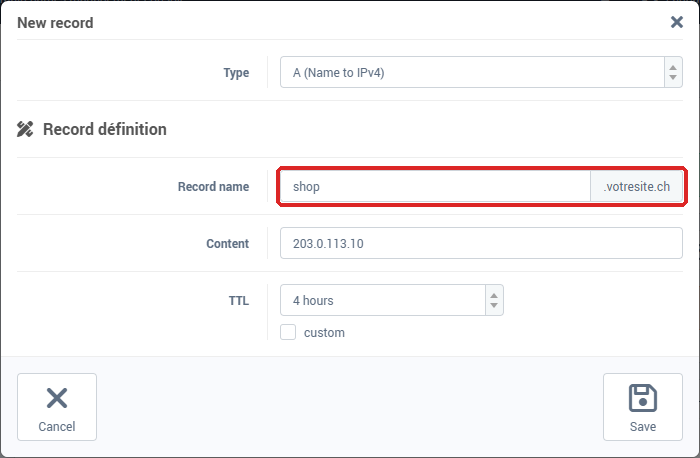
- Click Synchronize in the orange banner. Without this step, nothing is published.
The form in detail, and how to edit or delete a record, are described in Adding or editing a DNS record.
When is the change visible?
The change is not instant: servers that have already looked up this subdomain keep the old answer until its TTL runs out. If the provider has to issue an SSL certificate for this subdomain, it can only do so once the record is published.
To check the publication, analyze shop.yourdomain.ch with diag.swisscenter.com (the tool is in French), which accepts a subdomain and marks it with the Sous-domaine (subdomain) badge: in the Entrées Web & Mail (web and mail records) card, the Serveur Web (A) section should show the provider's address (for a CNAME, the addresses of its target), and no address under Serveur Web (A) or Serveur Web (AAAA) should still carry the SwissCenter badge. The tool also goes through a DNS resolver subject to the TTL. See Diagnose your domain and email with the SwissCenter diagnostic tool.
Troubleshooting
| What you see |
What to do |
| This record already exists |
A record of another kind already uses this name (an A while you add a CNAME, or the other way round). Edit the existing record, or delete it before adding the new one. |
| This field require an IP address |
An A record only accepts an IPv4 address. If the provider gives you a name, choose CNAME (Alias). |
| This field require a domain name |
For a CNAME, enter the server name without http://, without a path and without a final dot. |
The name shown ends with your domain twice (shop.yourdomain.ch.yourdomain.ch) |
The full name was typed in Record name. Edit the record and keep only shop. |
| The subdomain still shows the old content |
Check that the orange banner is gone (Synchronize) and that no second A or AAAA record still points to our servers, then wait until the TTL runs out. |
Going further