This guide explains how to configure a dynamic DNS (DDNS) record for a domain name whose DNS zone is managed at SwissCenter. This free alternative to Dyn and DynHost is very useful if you want to access devices connected to the Internet with a dynamic IP address from the outside (e.g., a NAS, a surveillance camera, a router, or an Internet box, etc.).
In short: in Hosting management, DNS service card, click Dynamic DNS, then Add: choose a Hostname, a Username and a Password, which you then enter in your device.
Prerequisites
- The domain's DNS service must be active at SwissCenter and the domain must use our name servers (see Point your domain to SwissCenter (name servers)): otherwise the record is created but nobody looks it up.
- Your device or application must support dynamic DNS records.
What you need to know before you start
- The record you create appears in the DNS manager, marked with a lightning bolt icon. It is locked: only your device updates it, not you by hand.
- The username and password you define belong to this dynamic DNS. They are not the credentials of your Apanel console, and they are what you will enter in your device.
How do I create a dynamic DNS on my domain?
- Log in to your Apanel console.
- Open the domain's Hosting management, then, in the DNS service card, click Dynamic DNS.
- Click Add.
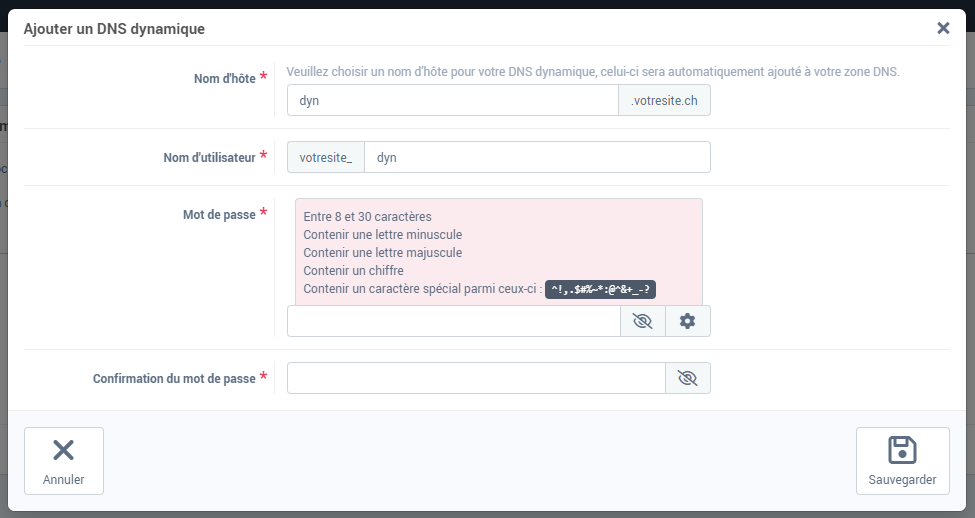
- In the Add dynamic DNS window, choose the Hostname of the dynamic record (your domain name is added after it automatically).
- Define a Username and a Password, then confirm the password. The username is automatically preceded by your login and an underscore (
login_): this full name, together with the full hostname and the password, is what you will enter in the configuration of your device or app.
- Click Save.
How do I configure the dynamic DNS on my device?
The dynamic DNS configuration varies from one device to another. The following guides are provided as examples:
If something goes wrong
- This host name is already in use, please choose another one!: a record already has this name in your DNS zone. Choose another hostname, or delete the old record if it is no longer used.
- This user name is already in use, please choose another one!: choose another username.
- The device is configured but the name does not answer: check that your domain uses our name servers, then look at the DNS change history to see whether the device's updates arrive.
Going further