Your website is built with Wix, but your domain and its DNS stay with SwissCenter, often together with your mail. To make yourdomain.ch and www.yourdomain.ch show your Wix site, you change two records in the DNS manager of the Apanel console. Your mail keeps working as before.
In short: in the DNS manager of the Apanel console, put the Wix IP address in the domain's A record and the Wix value in the www CNAME, delete the AAAA records, then click Synchronize. Do not touch the MX records.
Requirements
- A published Wix site to which you have started connecting your domain. Wix then shows you the DNS values to use.
- The DNS service enabled for the domain: the DNS service card appears in Hosting management.
- Your domain on our name servers (
ns1.swisscenter.com to ns4.swisscenter.com).
Before you start
- Choose the pointing method in Wix. Wix offers two methods: pointing, where you keep our name servers and only change two records, and changing the name servers, which moves your whole DNS to Wix, mail included. This article follows the first one; the Wix side is described in its documentation: Connecting a domain to Wix using the pointing method.
- Copy the values shown by Wix. As of 7 October 2026, the Wix documentation gives an IP address for the domain's A record and the name
pointing.wixdns.net for www. If your Wix dashboard shows other values, those are the ones that count.
- You do not need to disable the web service. The records for the domain and for
www are edited directly in the DNS manager. Disabling the web service, on the other hand, deletes all your website content with us: see the last section.
- Do not touch the MX records: they are what delivers your email.
How do I change the DNS records?
- Log in to your Apanel console.
- Click your domain name to open Hosting management.
- In the DNS service card, click DNS manager.
- In the list, click the A record that bears your domain name (
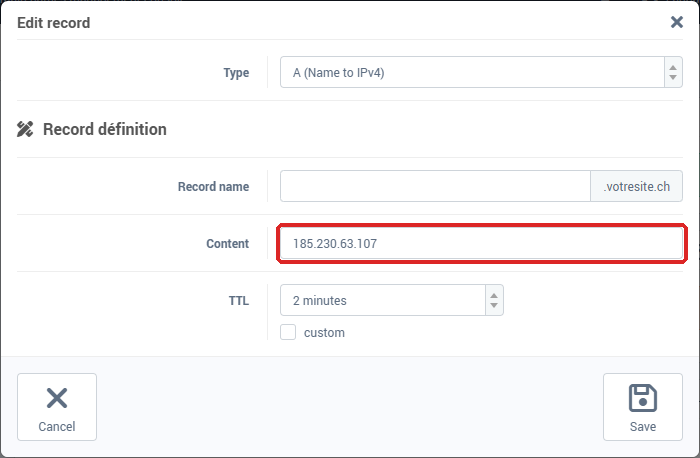
yourdomain.ch). In the Edit record window, replace the Content with the IP address given by Wix, then click Save. If it does not exist, create it with Add: type A (Name to IPv4), Record name left empty.
- Click the
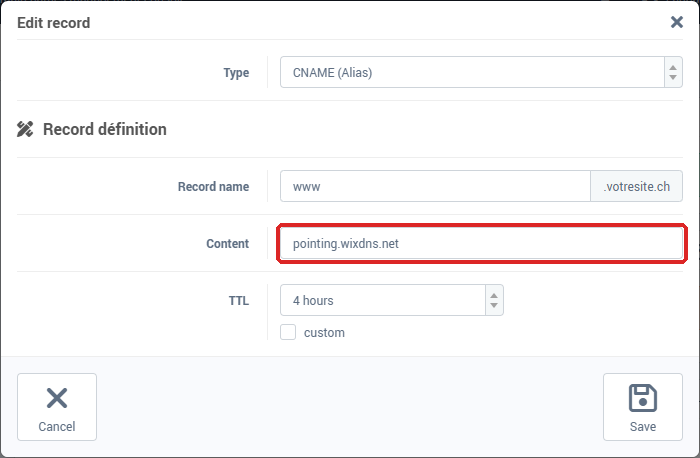
www.yourdomain.ch record, of type CNAME. Replace the Content with the value Wix gives for www, without a final dot, then click Save. If it does not exist, create it with Add: type CNAME (Alias), Record name www.
- If there are AAAA records for
yourdomain.ch or www.yourdomain.ch, tick them and delete them: they point to our servers, and visitors who connect over IPv6 would keep reaching us.
- Click Synchronize in the orange banner.
- Go back to Wix to finish connecting the domain.
The form is described in detail in Adding or editing a DNS record.
What happens after the change?
The old address can stay in memory on other servers until its TTL runs out (4 hours by default): depending on where they connect from, some visitors may still see the old site during that time. Wix then checks the connection on its side and installs its own SSL certificate.
To check, analyze your domain with diag.swisscenter.com (the tool is in French): in the Entrées Web & Mail (web and mail records) card, the Serveur Web (A) section should show the address given by Wix, Serveur Web (AAAA) should say « Pas d'entrée AAAA (IPv6 non configuré) » (no AAAA record, IPv6 not configured), and Serveurs Mail (MX) should list your usual mail servers. The tool also goes through a DNS resolver subject to the TTL, and removes www. from the name you enter: it does not check the www record. See Diagnose your domain and email with the SwissCenter diagnostic tool.
How do I delete my old website with you?
The files of your old website stay on your hosting as long as the web service is enabled. To delete them:
- First download a copy of whatever you want to keep.
- In Hosting management, click Service management, in the left-hand column, below the domain information.
- Set Use web service to No. Apanel shows: "Warning: Disabling the web service will result in the deletion of all site contents".
- Click Save.
The records pointing to Wix that you edited or added are kept. Your mail is not affected.
Troubleshooting
| What you see |
What to do |
| Wix says the domain is not connected yet |
Check both values, that the orange banner is gone (Synchronize) and that no AAAA record is left. Then wait until the TTL runs out. |
| This field require an IP address |
The A record only accepts an IP address: the Wix value for www goes into the CNAME record. |
| This field require a domain name |
For the www CNAME, enter the Wix value without a final dot. |
| This record already exists |
A name cannot carry both an A and a CNAME record: edit the existing record instead of adding one. |
The site shows without www but not with it (or the other way round) |
One of the two records was not changed: go through steps 4 and 5 again. |
| Your email no longer arrives |
Check that the MX records were not changed, and that you did not choose the name server method in Wix. |
Going further