The Sent mail log in the Apanel console lists the emails sent from your domain's addresses and shows, for each recipient, what their server did with the message: delivered, rejected, being retried, or held by our spam filter. It is the place to look when someone says they never received your message: you can see straight away whether it left, and if not, why.
Prerequisites
- A domain with at least one email address hosted at SwissCenter.
- Access to the Apanel console with permission to view email. Someone you have given access to only some mailboxes sees only the messages sent from those mailboxes.
Before you start
- The log covers messages sent from your mailboxes (webmail, Outlook, Thunderbird, phone) to the outside world. It does not contain:
- emails sent by your website (contact form, online shop, WordPress);
- messages exchanged between two mailboxes hosted on our mail server, which never leave it.
- The history is kept for six months. It never goes back further than the date the domain was added to your console.
- The list shows at most the 2,000 most recent messages matching the search. Beyond that, a notice asks you to shorten the period or refine the search.
- The log is for viewing only: it does not send, resend or block anything.
Open the send log
- Log in to your Apanel console.
- Choose the domain, then in Hosting management, click E-mail addresses.
- Click Sent mail, at the top right of the address list.
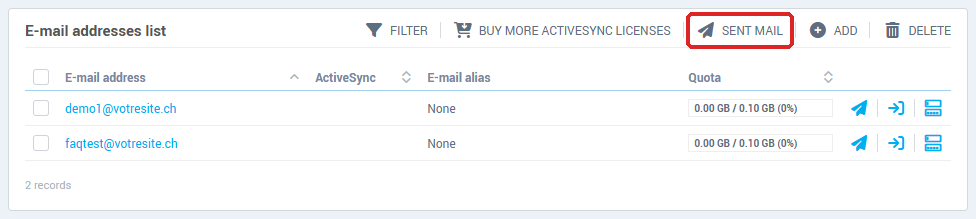
To go straight to the messages sent from a single address, click the paper plane icon on that address's row.
Choose the period and the mailbox
At the top of the page, choose the period: 24 h, 7 days (the default), 30 days or 6 months. The whole page follows the chosen period.
When you are looking at a single mailbox, its address is shown as the title; the Whole domain link takes you back to all addresses.
The counters
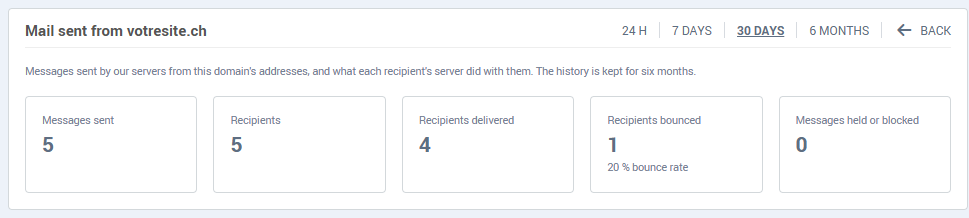
- Messages sent: the number of messages that left your mailboxes.
- Recipients: the total number of recipients of those messages (a message sent to three people counts as three recipients).
- Recipients delivered: those whose server accepted the message.
- Recipients bounced: those whose server refused the message, with the bounce rate for the period.
- Messages held or blocked: messages our gateway did not pass on (see below).
The "Sending over the period" chart
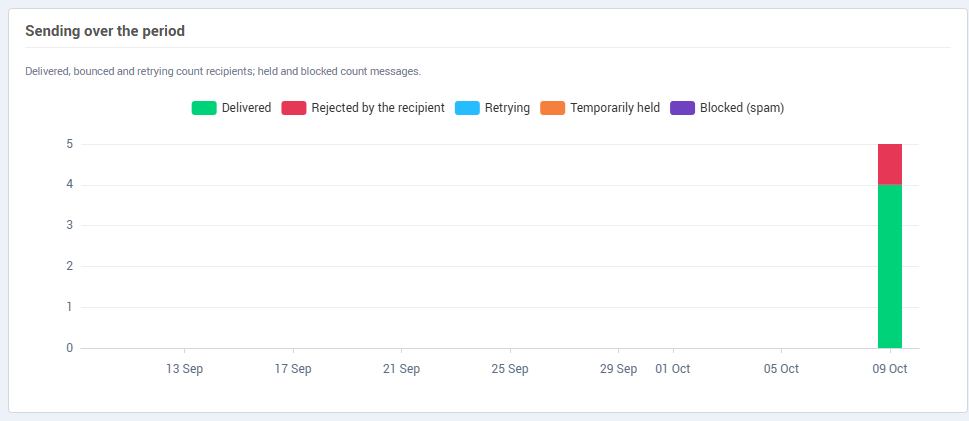
One bar per hour (24 h period) or per day. The colours match the statuses: delivered, bounced and retrying count recipients; held and blocked count messages.
The "By address" table

One row per email address of the domain: Messages, Recipients, Bounce rate and Held or blocked. Click an address to limit the whole page to its messages. An address sending far more than usual, or whose bounce rate is climbing, deserves a closer look: it is often the sign of a stolen password.
The "Sent messages" list
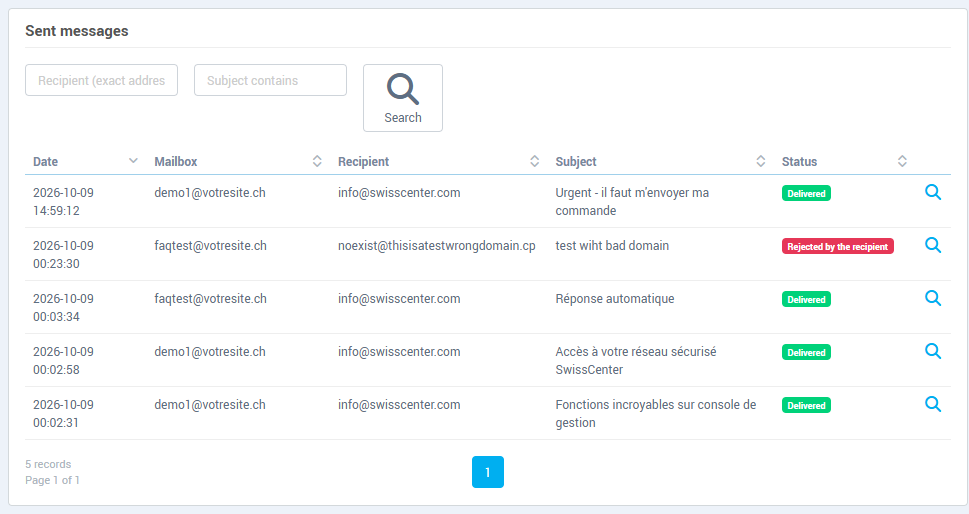
Each row shows the Date, Mailbox, Recipient (or the number of recipients), Subject and Status. To find a message:
- Recipient (exact address): enter the full address of the person you wrote to;
- Subject contains: enter a word from the subject;
- click Search. Clear search takes you back to the full list.
The counters, chart and table do not follow this search: they stay those of the chosen period and mailbox.
When the same message is sent several times within the same minute (same mailbox, subject, recipients and status), for example by an alarm or a device that sends in bursts, the list shows it on a single row with a badge giving the number of identical sends.
Statuses
| Status |
What it means |
| Delivered |
Every recipient's server accepted the message. |
| Queued |
The message left your mailbox; delivery has not been attempted yet. |
| Retrying |
The recipient's server asked to try again later; our server retries automatically. |
| Partially rejected |
Some recipients refused the message; the others received it or will receive it. |
| Rejected by the recipient |
The servers of all recipients refused the message. |
| Temporarily held |
Our gateway held the message, often because of the sending rate limit. Our mail server sends it again automatically. |
| Blocked (spam) |
Our spam filter refused the message: it was not passed on. |
Message details
Click the magnifying glass at the end of a row to open Sent e-mail details.
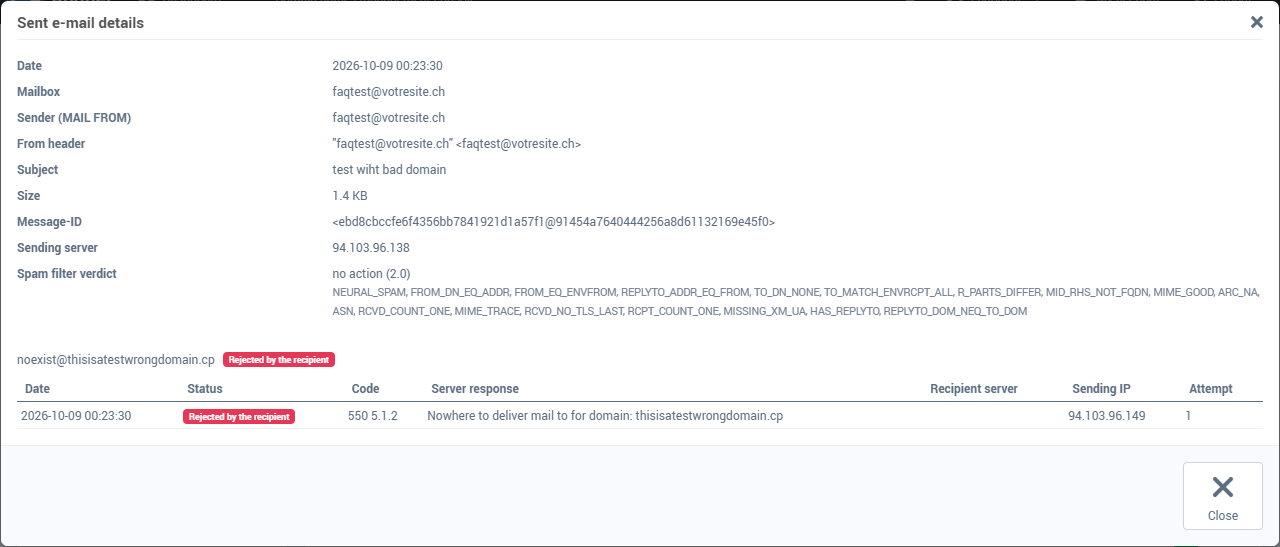
At the top, the message information: Date, Mailbox, Sender (MAIL FROM), From header, Subject, Size, Message-ID, Sending server and Spam filter verdict. If our gateway refused the message, the Refusal reason is added.
Below, one block per recipient with its status and each delivery attempt: Date, Status, Code, Server response (the exact text received during the attempt), Recipient server, Sending IP and Attempt. The Server response is what explains a rejection: mailbox does not exist, mailbox full, message considered spam by the recipient, and so on. In the example above, "Nowhere to deliver mail to for domain" means the recipient's domain does not exist: the address is probably misspelled.
For a group of identical sends, the details also list the other sends in the group; the one you are looking at is marked Shown.
Troubleshooting
- "The send log is temporarily unavailable. Please try again in a few minutes.": the service that stores the log is not responding. Nothing is lost; reload the page a little later.
- "Nothing to show: no mailbox of this domain is available to you.": your delegated access does not include any mailbox of this domain. Ask the account holder to give you access.
- A message does not appear in the list: check the period, and remove the recipient or subject search. An email sent by your website, or between two of your mailboxes, never appears here.
- Status Rejected by the recipient: read the Server response in the details. A misspelled or deleted address is something to fix on your side; a refusal for spam or reputation is often solved with SPF, DKIM and DMARC.
- Status Blocked (spam): if the message is legitimate, contact support with its date and subject. If you do not recognise these messages, change the mailbox password immediately.
- Status Temporarily held: wait for the automatic resend, then look for a more recent message with the same subject.
Going further