Forgot the password of your Apanel console? You can reset it yourself from the swisscenter.com website: a link is sent to you by email, to the contact address of your contract. This article also explains what to do if that address is no longer valid, and how to keep it up to date.
In short: on www.swisscenter.com, Customer space, Console tab, Oups, I forgot my password link: enter your domain name and the contact email address of your contract, then follow the link sent by email (valid for 24 hours).
Prerequisites
- The domain name of your hosting.
- Access to the contact email address of your contract: the owner's or the technical contact's.
What you need to know before you start
- The Apanel console is at https://swisscenter.com/#console. It asks for your Username and your Password. The Third-party access link on that page is reserved for the people you have given access to your hosting.
- The console login page has no link for a forgotten password: the reset is done on the www.swisscenter.com website.
- The link sent by email is valid for 24 hours, and only once.
- The new password must be 12 to 30 characters long, with at least one lowercase letter, one uppercase letter, one digit and one special character among
^ ! , . $ # % ~ * @ & + _ - ?. Spaces, accents and other symbols are refused.
- After 10 wrong attempts within 15 minutes, the console and the reset form refuse the next attempts, even correct ones. Wait a quarter of an hour before trying again.
- The reset does not affect two-step authentication: if it is enabled on your account, the code from your app will still be requested.
How do I reset my password?
- Open https://www.swisscenter.com/en/customer-space/forgot-password. You can also reach it from the www.swisscenter.com website: Customer space, Console tab, Oups, I forgot my password link.
- Enter the Domain name of your hosting, without
http://, and the contact E-mail address of your contract.
- Click Next step. The message "E-mail containing a link to change the password has been sent to the …" is displayed.
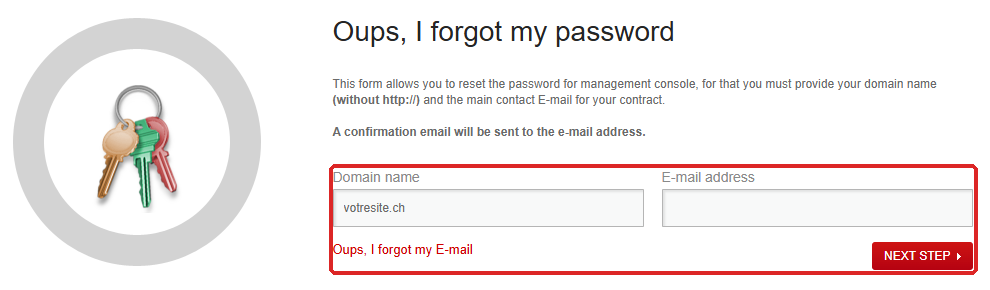
- Open the email SwissCenter - Change password request, then click the link it contains.
- On the Change my password page, enter the new password in Password, then again in Confirmation.
- Click Next step. The website login window opens.
- Log in with your username and the new password, from that window or on https://swisscenter.com/#console.
If the contact email address is no longer valid
If you no longer have access to the email address of your contract, the online reset is impossible: we first have to change that address, using a signed form.
- Download the Global Change request form: https://www.swisscenter.com/doc/change_global_en.pdf. It is also offered by the Oups, I forgot my E-mail link of the reset page, and on the Support page of the www.swisscenter.com website.
- Under "What has to be modified", tick Address, then write your domain name on the Domain Name line.
- In the Address section, fill in the e-mail line: the old address under Actual, the new one under New.
- Date and sign the form in the VALIDATION section.
- Scan it and send it to the email address given on the form, info@swisscenter.com.
Once the address has been changed, start the reset again from step 1 of the previous section.
How do I keep the email address of my contract up to date?
The reset form accepts the email address of the owner or that of the technical contact. Once logged in, check that at least one of them is an address you read:
- In your Apanel console, click My account, then My addresses in the left-hand menu.
- In the Owner's address or Technical contact block, correct the E-mail address field.
- Click Save. The message "Operation succeeded" is displayed.
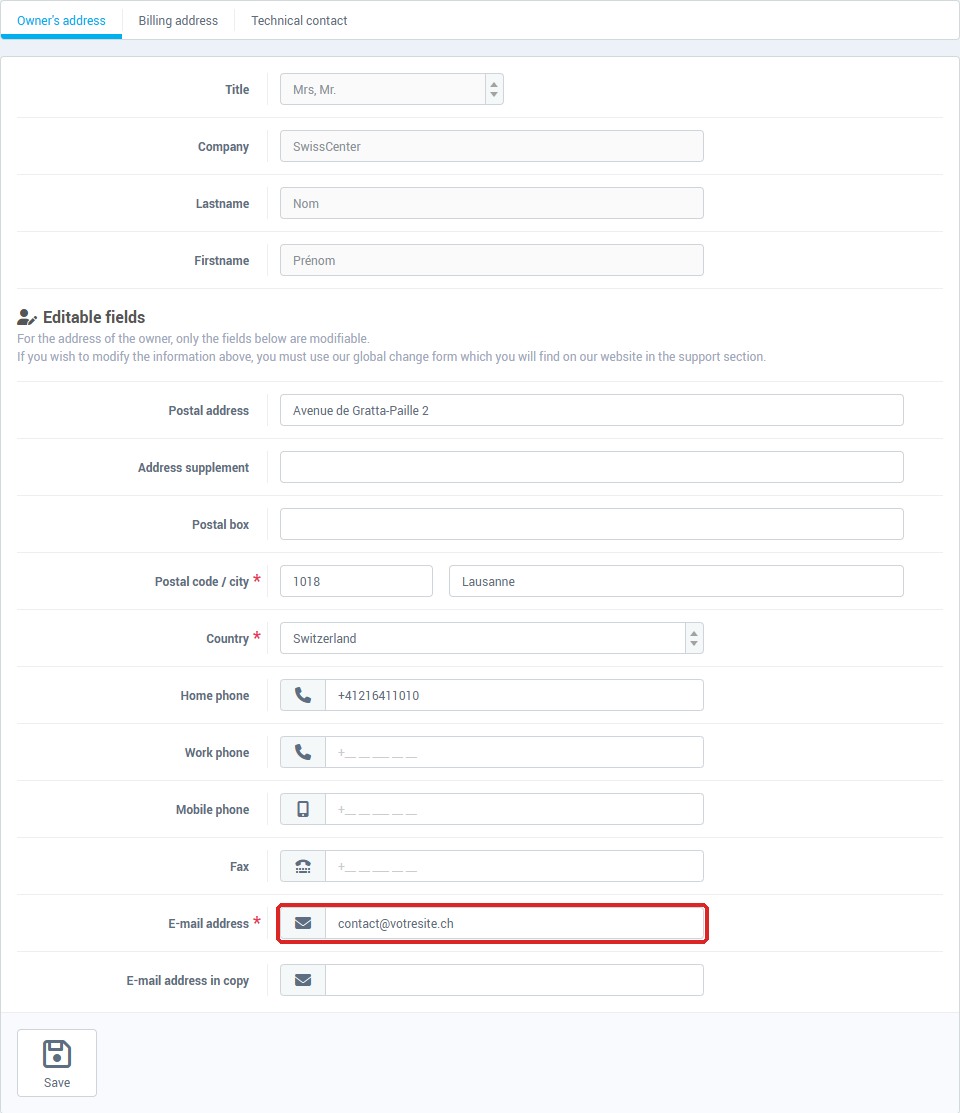
In the Owner's address, the name and the company cannot be changed from the console: a change of owner goes through the Global Change request form.
What if I have lost access to two-step authentication?
If Two steps authentification is enabled on your account, the console asks, after the password, for the code generated by your authentication app. If you have lost the phone that carries this app, no online procedure can disable it: open a request with support, or write to support@swisscenter.com, stating the domain name of your hosting.
Troubleshooting
| Message or situation |
What to do |
| "The E-mail address does not match the domain name." |
The address entered is neither the owner's nor the technical contact's for this domain. Check the spelling of both fields. This message also appears after 10 wrong attempts within 15 minutes: wait a quarter of an hour. If the address is no longer valid, see "If the contact email address is no longer valid". |
| "Incorrect domain name" |
Enter only the domain name, for example votresite.ch, without http:// or a path. |
| The reset email does not arrive |
Check your junk mail folder. If the website shows "A problem occurred when sending the confirmation E-mail.", try again later. |
| "The password cannot be changed because your link has expired" |
The link is more than 24 hours old or has already been used. Click Restart procedure. |
| "Your link expired before the form was submitted, the password you entered was not saved." |
Your old password is still valid. Start the procedure again from the beginning. |
| "The password contains characters that are not allowed: …" |
Remove the characters listed. The : character, accepted elsewhere, is refused here. |
| "The password can be changed at this time, if this problem persists please use the support." |
Despite its wording, the change has failed. Try again a little later, then open a request if the problem persists. |
| "Username or password is incorrect" (console) |
Check your username: it is not your email address. After 10 wrong attempts within 15 minutes, wait a quarter of an hour. |
| "Your password is expired, you have to set a new one !" (console) |
Enter a new password in both fields, then click Change my password. |
| "Unable to login, your account has been suspended." |
Changing the password does not help: open a request with support. |
| You no longer know your username |
Open a request stating the domain name of your hosting. |
Going further