Forcing HTTPS no longer requires editing any file: the console applies the redirection for the entire site with a single checkbox.
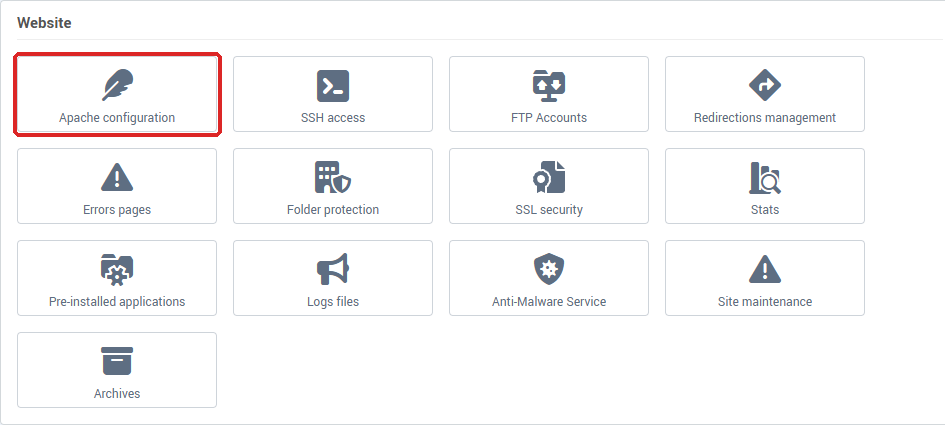
In short: Hosting management → Website section → Apache configuration → enable Automatic https redirection → Save.
Prerequisites
- An active SSL certificate on the site. Redirection only makes sense if your site already has a certificate. If not, the console refuses activation and sends you to the SSL security menu, where you can activate a free certificate for your domain (see Install an SSL certificate on a domain).
- A site that responds correctly via
https://. Check it before activating the redirection: once it is in place, there is no longer any access via http:// for testing. Our public tool diag.swisscenter.com (the tool is in French) shows it without changing anything: in the Site web (TLS & HTTP) card, Certificat TLS (443) should say Valide (valid) and Réponse HTTP (HTTP response) should show a code over HTTPS, for example 200 en HTTPS. It queries https:// first and does not follow redirects, so it does not check the redirection itself. See Diagnose your domain and email with the SwissCenter diagnostic tool.
SSL certificate and redirection: two different settings
The padlock needs both, and one does not replace the other:
| Setting |
Where |
What it does |
| Let's Encrypt certificate |
SSL security |
Makes your site reachable via https://. Free and renewed automatically. |
| Automatic https redirection |
Apache configuration |
Sends visitors who type http:// to https://. It does not create any certificate. |
In SSL security, do not choose Generate a self-signed certificate for a site that visitors open directly: browsers do not recognise it and show a security warning. This mode is meant for sites behind a proxy such as Cloudflare.
How do I activate the HTTPS redirection?
- Log in to your Apanel console.
- Open Hosting management for the relevant domain.
- In the Website section, click Apache configuration.
- Enable Automatic https redirection.
- Click Save.
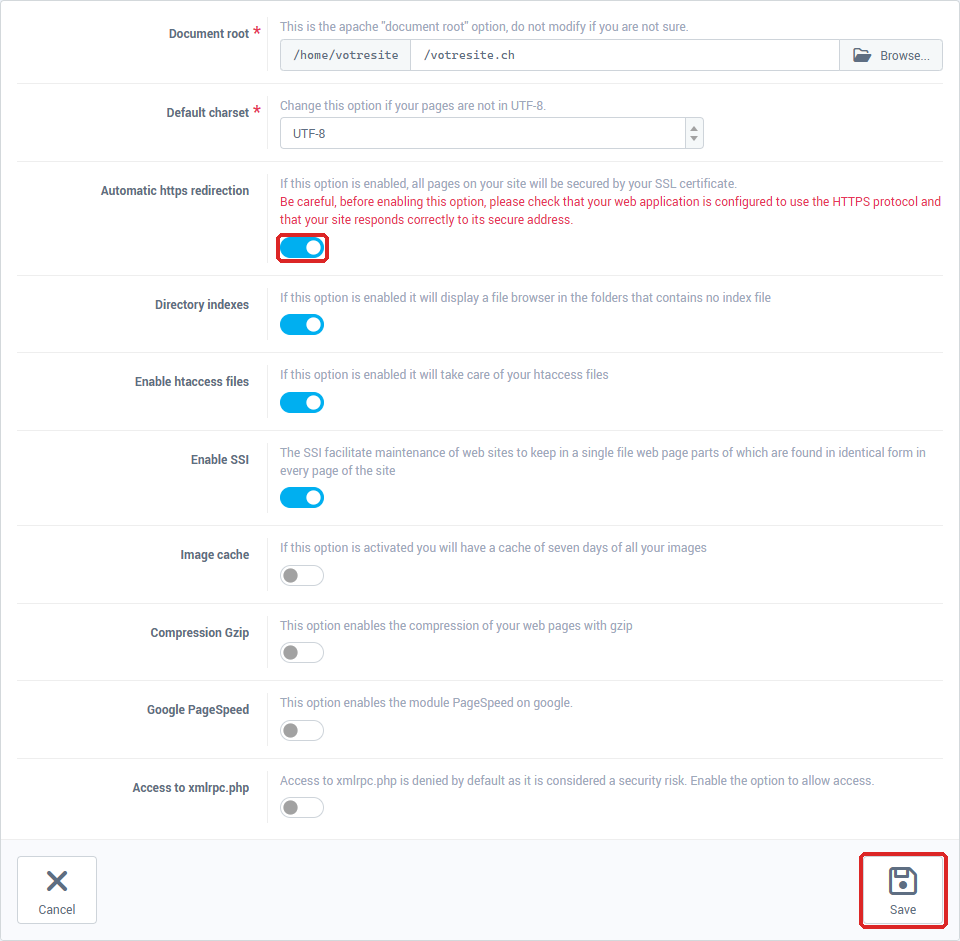
The configuration is regenerated and reloaded immediately: all pages called via http:// are now redirected to their secure equivalent.
Check your application first. A site that still loads images, stylesheets or scripts via http:// will display a crossed-out padlock ("mixed content") once in HTTPS. Correct these addresses before activating the redirection.
Which address should I correct in my CMS?
The redirection acts at the server level. Your CMS, however, keeps the address declared in its database. If it remains in http://, it will continue to generate non-secure links.
| CMS |
Where to correct the address |
| WordPress |
Settings → General → WordPress Address and Site Address |
| Joomla |
System → Global Configuration → Server tab → Force HTTPS |
| PrestaShop |
Shop Parameters → General → Enable SSL, then Enable SSL on all pages |
What if I need a custom rule?
The console option covers the common case: the entire site, at once. For a specific rule (enforcing HTTPS only on a subdirectory, for example), you can still write the rule yourself in a .htaccess file placed at the root of your site:
RewriteEngine On
RewriteCond %{HTTPS} !=on
RewriteRule ^(.*)$ https://%{HTTP_HOST}%{REQUEST_URI} [R=301,L]
Do not use both methods at the same time: the console option and a .htaccess rule may respond to each other and cause a redirection loop.
Two points often forgotten in recipes found online:
[R=301,L] and not [R,L]: without the 301, the redirection is declared temporary, and search engines continue to index the non-secure version.%{HTTP_HOST} rather than the hard-coded domain name: the rule remains valid if the site also responds on www or on another domain.
Troubleshooting
- "SSL security has not been enabled for your site": the site does not have a certificate yet. Activate one in SSL security, then come back to Apache configuration.
- The browser shows "not secure" although a certificate is installed: check in SSL security that it is not a self-signed certificate. If it is, click Uninstall the certificate on that page: the site goes back to the Let's Encrypt certificate. If in doubt, contact support.
- The site still opens via
http://: the redirection is not active. Follow the steps above again and remember to click Save.
- The browser reports a redirection loop: the console option and a
.htaccess rule are active at the same time. Keep only one of them.
- The padlock stays crossed out: the page still loads resources via
http://, or the address stored in your CMS is still in http:// (see the table above).
- The
.htaccess rule has no effect: check that the Enable htaccess files option is enabled in Website → Apache configuration. It is enabled by default.
Going further