When you create a database in the Apanel console, you choose its SQL engine: MySQL Percona 8.4 or MariaDB 11.4. For the vast majority of websites the two are equivalent: they speak the same language, are used the same way, and both are long-term support versions. This article helps you choose, and tells you in which cases the choice really matters.
In short
- You do not know which one to take: keep the option marked "(default)". WordPress, Joomla, Drupal, PrestaShop and most CMSs and shops work with both.
- The documentation of your software asks for a specific engine: follow it (see the table below).
- You are moving a website from another host: take the same engine as the old one, and you will avoid import errors.
- The choice is made at creation and cannot be changed afterwards: see the last section if you need to change.
Where the choice is made
The engine is chosen in the SQL engine field of the Add database form (see Create a MySQL database and its user). Each database has its own engine: you can have a WordPress on one and an application on the other. The list of your databases shows the engine of each one in the SQL engine column.
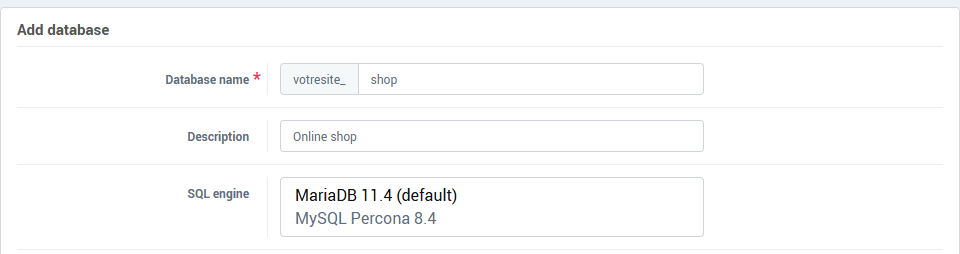
If the field does not appear, your hosting does not offer this choice: the database is created on the database server of your hosting.
The two engines in two lines
- MySQL Percona 8.4: this is MySQL 8.4, the long-term support version of MySQL, in its Percona Server variant, which stays compatible with MySQL. It is the reference engine of much of the software written for MySQL.
- MariaDB 11.4: MariaDB comes from MySQL and has been developed separately since. 11.4 is a long-term support version.
On the console side, nothing changes from one engine to the other: same hostname (localhost), same port (3306), same users and credentials, same phpMyAdmin, same backups and restorations.
What software vendors ask for
Collected in October 2026 from the official documentation of each software. Both our engines meet the requirements of all the software in this table.
| Software |
What the vendor says |
Our reading |
| WordPress |
MariaDB 10.11 or greater, or MySQL 8.0 or greater |
Both are fine |
| Joomla 6 |
MySQL 8.0.13 or greater (8.4 recommended), MariaDB 10.6 or greater |
Both are fine; MySQL 8.4 is the version the vendor recommends |
| Drupal 11 |
MySQL 8.0 or greater, MariaDB 10.6 or greater |
Both are fine |
| PrestaShop 8 and 9 |
MySQL 5.7 or greater, MariaDB 10.2 or greater |
Both are fine |
| Nextcloud |
MySQL 8.4, MariaDB 10.11, 11.4, 11.8 or 12.3 |
Both are fine |
| Adobe Commerce (Magento) 2.4.8 |
MySQL 8.4 or MariaDB 11.4 |
Both are fine, but Adobe states that MySQL 8.4 is the last MySQL version it supports and recommends MariaDB: prefer MariaDB 11.4 for a new project |
For any other software, look in its documentation for "system requirements": the "database" line says which versions of MySQL and MariaDB are accepted. If both are listed, you can take the default engine. Common PHP frameworks such as Laravel and Symfony also work with both.
Choose MySQL Percona 8.4
- The software or an extension was written for MySQL. The two engines do not store
JSON columns the same way: MariaDB saves them as text, and does not know MySQL's -> and ->> operators. An extension that uses them may not work on MariaDB.
- You import a database from a host that uses MySQL 8. Its export usually mentions the
utf8mb4_0900_ai_ci collation, which MariaDB does not know: the import stops on the "Unknown collation" error (code 1273).
- The vendor recommends MySQL 8.4, like Joomla 6.
- Your agency or contractor works on MySQL and reproduces here the setup of their tests.
Choose MariaDB 11.4
- You import a database from a host that uses MariaDB. Conversely, a recent MariaDB export may contain collations that MySQL does not know, with the same error 1273.
- The vendor recommends MariaDB, like Adobe Commerce.
- Nothing forces you to use MySQL. WordPress, Drupal and PrestaShop list MariaDB on a par with MySQL.
Practical cases
| Your situation |
Advised engine |
| New WordPress, Joomla, Drupal or PrestaShop site |
The one marked "(default)" |
| Existing site to move from another host |
The same engine as the old one (see below) |
| Custom-built application |
The one your developer used for testing; with no answer, the default engine |
Extension or module that requires MySQL JSON columns |
MySQL Percona 8.4 |
| New Adobe Commerce (Magento) shop |
MariaDB 11.4 |
| You do not know |
The default engine, and ask support for advice with the name and version of your software |
Find out which engine the old host uses
Open the .sql export file of your database in a text editor: the first line starts with -- MySQL dump or -- MariaDB dump, followed by the version number. If you have phpMyAdmin at the old host, its home page also shows the server version.
Change engine afterwards
The engine of an existing database cannot be changed. To move from one to the other:
- Create a new database on the other engine (see Create a MySQL database and its user). Leave the old one untouched for now.
- Export the old database and import the file into the new one (see Export or import a MySQL database with phpMyAdmin). If the import stops on "Unknown collation", open the export file in a text editor and replace the unknown collation (
utf8mb4_0900_ai_ci or utf8mb4_uca1400_ai_ci) with one known to both engines, for example utf8mb4_unicode_520_ci.
- Update your website configuration to use the name of the new database, its user and its password (for WordPress, the
wp-config.php file).
- Test the website, in particular pages with accents and the administration pages.
- Delete the old database only when everything works.
If the website is important, do this outside peak hours, and keep a backup before deleting anything (see How to restore your database).
Troubleshooting
- "Unknown collation" on import: the export file contains a collation that the engine of the new database does not know. See step 2 above.
- An extension or a page stops working after the change: it probably uses a feature specific to the other engine. Go back to the old database (it is still there if you did not delete it) and contact the extension's vendor.
- Unsure which engine to take: contact support, stating the name and version of the installed software.