The antispam filter of our mail server classifies every email it receives according to how likely it is to be spam. In webmail, you choose what happens to each category of suspicious messages: leave them in the inbox, move them to the junk email folder, delete them, or tag them by adding text to their subject. The last option means you never lose a legitimate email that was misclassified, while still spotting spam at a glance.
In short: in webmail, click More, Settings, then Spam Filtering, turn on Override spam settings, choose an Action for each level, then click Save.
Prerequisites
- The email address and its password, to log in to webmail.
- The Webmail service must be enabled for this address: without it, the user can no longer manage their spam (see Manage the services of an e-mail address).
What you need to know before you start
- The setting applies to one address only: the one you are logged in to webmail with. Repeat the procedure for each address concerned.
- This setting is not the only filter. Before reaching your mailbox, every email goes through the antispam filter of our server, and the Blacklist / whitelist rules of the Apanel console also apply at that stage. A message rejected at that point never reaches webmail, whatever the setting described here, which only concerns messages that were accepted and then classified as suspicious.
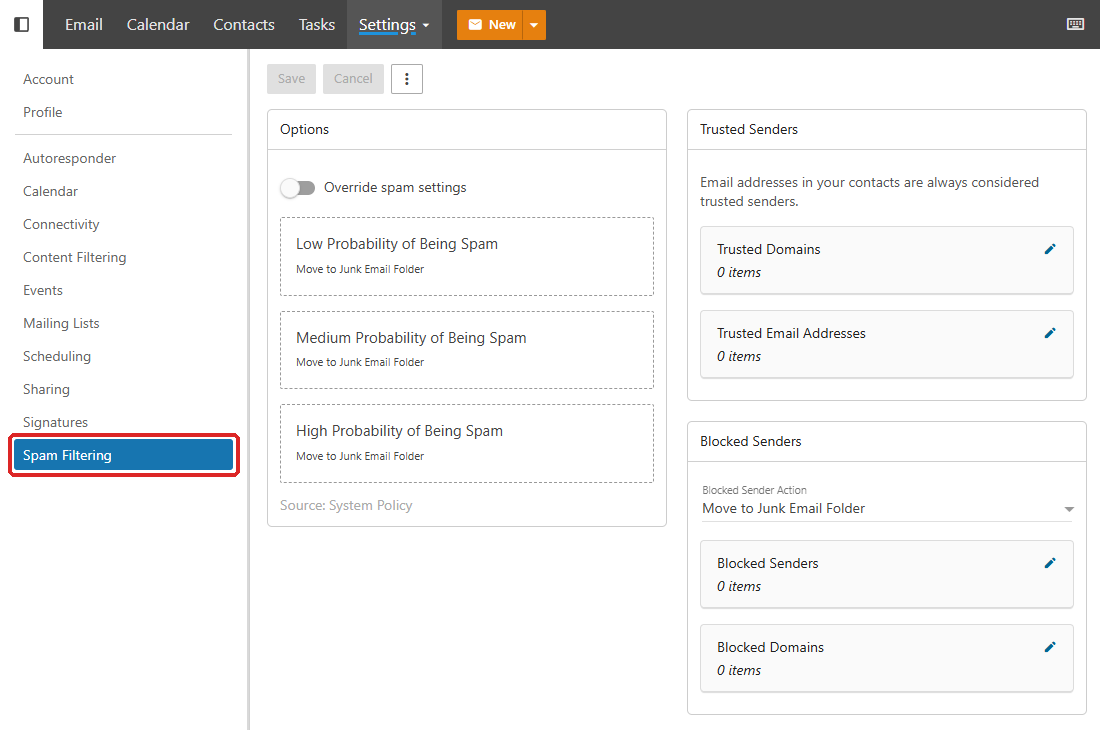
- As long as you do not enable Override spam settings, our server's default actions apply. The page shows them under each level, with the mention Source: System Policy.
- The addresses in your contacts are always considered trusted senders. The Trusted Senders card, on the same page, lets you add Trusted Domains and Trusted Email Addresses.
- The junk email folder is not an archive: check it regularly. By default, messages older than 15 days are deleted from it automatically (Folder Auto-Clean card on the Account page of the webmail settings).
- With POP, the junk email folder is not downloaded: an email client set up with POP only downloads the inbox. Messages moved to junk are only visible in webmail. This is the case where tagging messages, rather than moving them, is most useful.
What are the spam levels?
An email that is not considered suspicious is delivered to the inbox. The others are placed in one of the following three levels, and each level has its own action:
| Level |
Label in webmail |
| Low suspicion (spam-low) |
Low Probability of Being Spam |
| Medium suspicion (spam-med) |
Medium Probability of Being Spam |
| Confirmed spam (spam-high) |
High Probability of Being Spam |
Which actions can I choose?
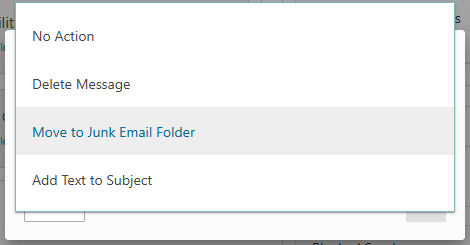
| Action |
What happens to the message |
| No Action |
It is delivered to the inbox, unchanged. |
| Move to Junk Email Folder |
It is placed in the junk email folder. |
| Add Text to Subject |
It is delivered to the inbox, with text added to the beginning of its subject (for example [SPAM]). |
| Delete Message |
It is deleted without going into any folder. A legitimate message misclassified would be lost: keep this action for the High Probability of Being Spam level, if you use it at all. |
How do I choose the action for each level?
- Log in to webmail with the email address and its password. From the Apanel console, you can also open the Hosting management of your domain, click E-mail addresses in the E-mail card, then the Webmail button of the address.
- In the top bar, click More, then Settings. In the left-hand menu, click Spam Filtering:
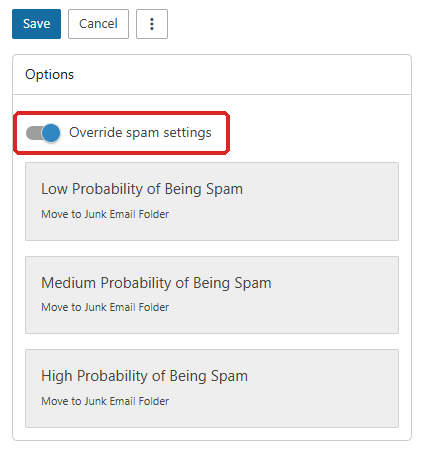
- Turn on the Override spam settings switch.
- Click the level you want to set, for example High Probability of Being Spam.
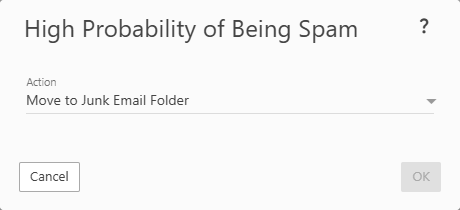
- In the Action list, choose the action you want (see the table above).
- Click OK. Repeat steps 4 to 6 for each level you want to change.
- Click Save at the top of the page to record your choices.
Two common settings
Tag suspicious messages instead of moving them
If legitimate emails end up in junk and you do not want to lose any of them, have the antispam filter only tag suspicious messages:
- Follow steps 1 to 4 above.
- For each of the three levels, choose Add Text to Subject, replace the text suggested in Text to Add (
Junk E-Mail by default) with your own, for example [SPAM], then click OK:
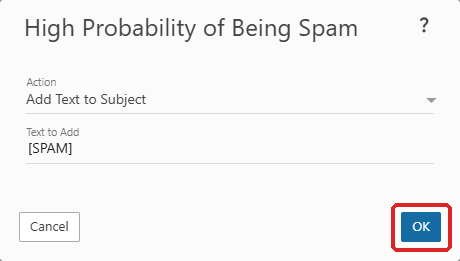
- Click Save.
All messages then arrive in the inbox, and suspicious messages can be recognized by the text added to their subject. To sort them automatically, create a rule in your email client that moves messages whose subject starts with this text into a folder.
Keep low suspicions in the inbox
By default, our server moves the messages of all three levels to the junk email folder. If legitimate emails regularly end up there, you can handle only the most uncertain level differently:
- Turn on Override spam settings, then click Low Probability of Being Spam.
- Choose No Action, or Add Text to Subject to keep a marker, then click OK.
- Click Save.
The other two levels still go to junk.
How do I go back to the default settings?
Turn off the Override spam settings switch, then click Save. Our server's default actions apply again.
Troubleshooting
| What you see |
What to do |
| Your choices are not taken into account |
Check that Override spam settings is on and that you clicked Save after OK. The setting only applies to the address logged in to webmail. |
| A legitimate correspondent ends up in junk |
Add them to your contacts or to the Trusted Senders card, or add a rule to the Whitelist in the Apanel console (see Block or allow a sender). |
| Your email client does not show the messages moved to junk |
An email client set up with POP only downloads the inbox. Check the folder in webmail, switch to IMAP, or choose Add Text to Subject instead of moving. |
| An expected email arrives nowhere, neither in the inbox nor in junk |
Check that no level is set to Delete Message and that the sender is not in the Blacklist of the Apanel console. Otherwise, the message may have been rejected before arriving: contact our support with the sender's address and the approximate time it was sent. |
| Spam still arrives in the inbox |
It was not classified as suspicious. If the same sender keeps coming back, block it in the Blacklist. To report the case to us, send us the message with its full header. |
| The Webmail button in the Apanel console does not open the mailbox |
The Webmail service is probably disabled for this address: re-enable it in the address's Services tab. |
Going further